This article explains how to use accounts for invoicing purposes. For an introduction into accounts and its functionality, check out Using accounts.
Invoicing with accounts
Accounts are used with invoicing to display company info on the receipt.
- Activate the company account (Activating an Account). If it's missing, you might need to create it (Creating a new Account).
- Check that the account contains all the company info the guest might require, e.g., Guest name, Company name, Address, email address, etc. If needed, update the company info (Updating account info).
- Add the products to the order and use the Invoice payment method. By default, the receipt printed will be in 2 copies with a signature line:
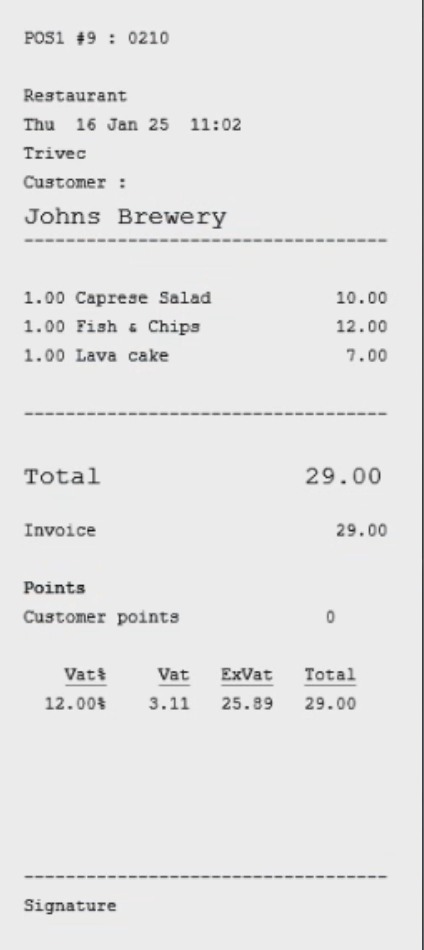
- The guest (representing the company) needs to sign at the signature line. This copy of the receipt is saved and then used to invoice the company.
Note that using any other payment method (cash or card) is also possible. This is useful if the guest pays and then requests a refund from their company. Having the bill assigned to the company account will display the correct company info on the receipt.
Cancellations and refunds with invoicing account
Cancellations are only possible on the same day the invoice was billed before Domino performed the EndOfDay.
Later corrections need to be made as refunds. To learn more, check out Cancellation & Refunds.
What's next?
Find out more about:
- Creating, editing or deleting accounts: Managing accounts.
- Accounts with VIP: Using accounts with VIP
- Accounts with discounts: Using accounts to apply discounts (Domino) and Using accounts to apply discounts (Handy).
- Accounts for bar tabs: Using accounts as Bar Tabs
Was this article helpful?
That’s Great!
Thank you for your feedback
Sorry! We couldn't be helpful
Thank you for your feedback
Feedback sent
We appreciate your effort and will try to fix the article