This article introduces Trivec's integration with Seven rooms (7 rooms, 7R) and provides information on how it is used and managed.
About SevenRooms
SevenRoomsis an US based online reservation tool, empowering hospitality owners to create direct, meaningful and profitable guest relationships. Their European office is based in UK (London).
Functionality
SevenRooms Booking Info
When the table is opened in Domino, the booking status in SevenRooms is updated as ongoing. When the table is billed, ticket information is sent to SevenRooms, and the table reservation is updated.
Regions
Available in Belgium, Denmark, Finland, France, Netherlands, Norway, Sweden.
Onboarding
- Customer contacts SevenRooms and order integration.
- Customer signs an agreement with Trivec.
- SevenRooms trains the customer in how their product is used.
- Customer does the preliminary config in SevenRooms.
- Trivec prepares the Domino environment for SevenRooms.
- Customer starts using SevenRooms.
Using
SevenRooms table info
Reservation is updated in SevenRooms completely automatically and doesn't require any interaction from the user.
The integration uses an automatic linking process using table nr as identifier.
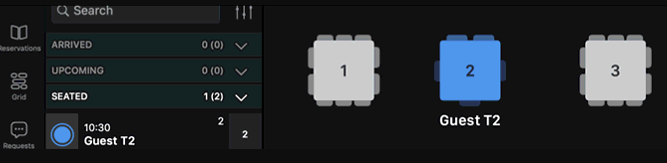
- Create a reservation on SevenRooms, then move it on a table and update status to seated:
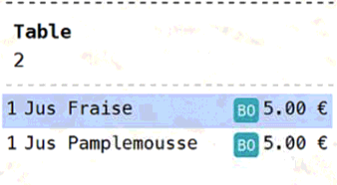
- Start an order on Domino side, using the same table nr:
- Reservation is now linked in SevenRooms using Domino checkid as unique ticket reference. Ticket details can be viewed on each linked reservation:
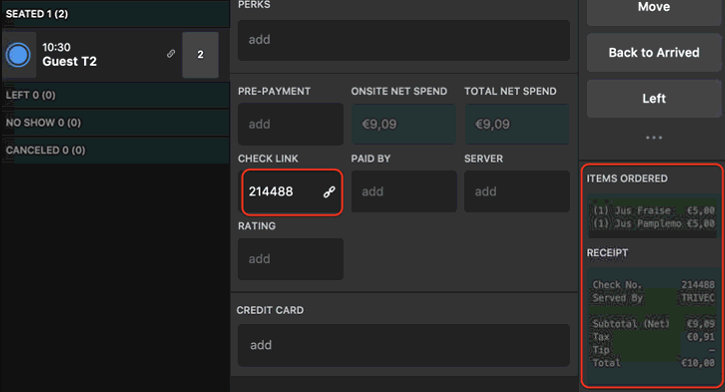
As the linking process is based on table nr value, make sure that tables are being created the same way on SevenRooms side, and that ONLY numbers are being used (alphanumeric table numbers is not supported in Domino).
Note that tables can as well be linked manually through POS check link screen:
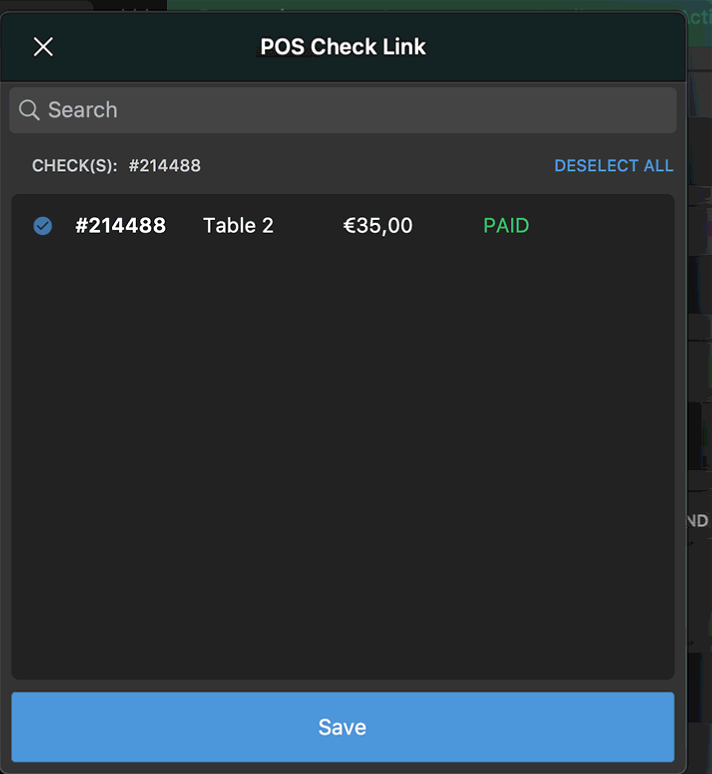
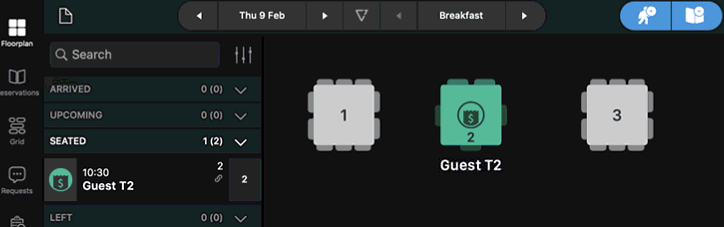
- Once ticket is closed in Domino, table state is updated to Paid on 7R side:
Maintaining
Creating/modifying table plans
Every time a table is added or removed in Domino, the change has to be done in SevenRooms as well.
Table plans are not part of the integration, table matching is done on table number value only.
Customer is supposed to manage its table configuration on their own.
Was this article helpful?
That’s Great!
Thank you for your feedback
Sorry! We couldn't be helpful
Thank you for your feedback
Feedback sent
We appreciate your effort and will try to fix the article