This article explains what DCC is and how Westpay has implemented it.
About DCC
DCC - "Dynamic Currency Conversion" or "Dynamic Currency Exchange", is a solution for exchanging currency directly at the time of payment.
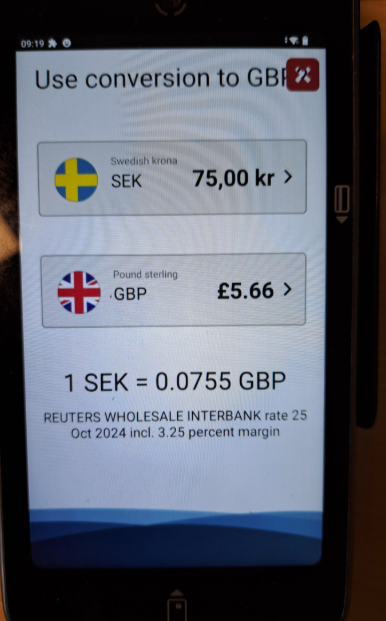
Foreign guests who pay with Visa or Mastercard are offered to pay in their own currency instead of Swedish kronor.
Westpay supports DCC through Elavon (Sweden, Denmark, Norway) and Worldline (Sweden) only.
For EPAS and PayDirect transactions, the disclaimer is printed on the VAT receipt issued by Domino.
For Pay@Table transactions, the disclaimer is printed on the guest's transaction receipt. However, the exchange rate, the total in both local and foreign currencies, is displayed on the VAT receipt.
To have DCC enabled, contact your Inhouse Sales team.
Using DCC
If the card used supports purchases in a currency other than SEK, this will be displayed on the terminal. The guest will see the total amount in both SEK and the local currency. The guest can then choose on the screen which currency to complete the purchase in.
Foreign guests who pay with Visa or Mastercard are offered to pay in their own currency instead of Swedish kronor.
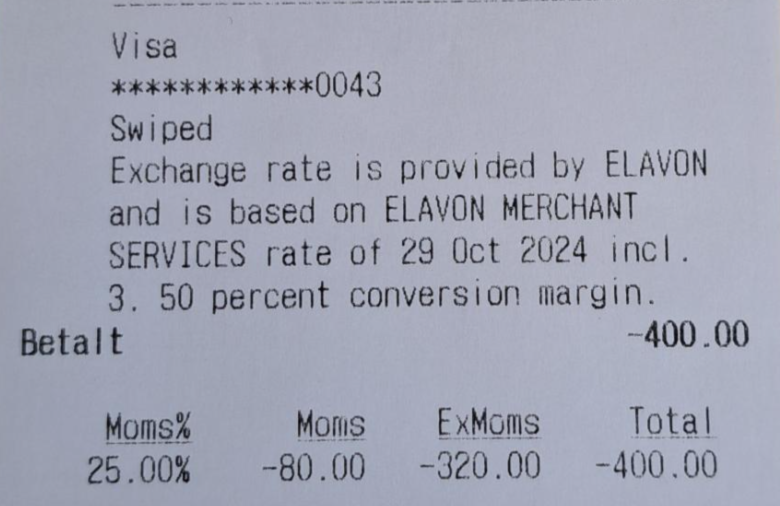
In the case of a DCC transaction, extra information is written on the receipt.
Receipts
Visa transactions include a longer disclaimer compared to Mastercard transactions. All DCC information is provided by the acquirer.
| Visa transaction: | Mastercard transaction: |
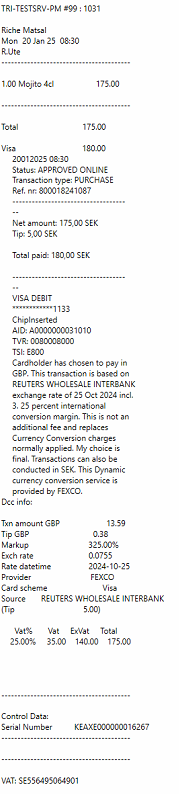 |
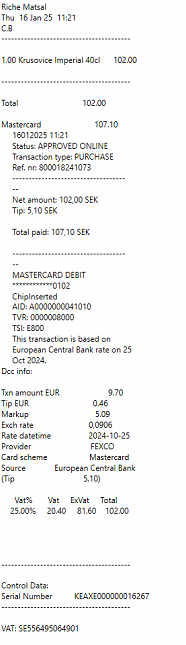 |
Receipt info:
- Total transaction amount of the goods and services shown in the merchant's local currency
- Currency symbol or code of the merchant's local currency
- Total transaction amount in the offered DCC transaction currency
- Currency symbol or code of the offered DCC transaction currency
- Exchange rate used to determine the DCC transaction amount
- Any commission, fees or markups over the wholesale or government mandated rate
- The words "Transaction Currency", "Transaction Amount", "Amount Charged" or any accepted variation before or after the DCC currency code or symbol
- Proof of the cardholder's choice to pay in the transaction currency
- A statement indicating that the cardholder has been offered a choice of currencies
- A statement indicating that “DCC service was provided by {Merchant Name}”
- DCC related information on the receipt must be presented in English or in a language that the cardholder can understand.
Refunds with DCC
When doing a refund, DCC prompt will be displayed only if terminal is set to EPAS mode. If refund is sent to a P@T/PayDirect terminal, the refund will be in SEK by default.
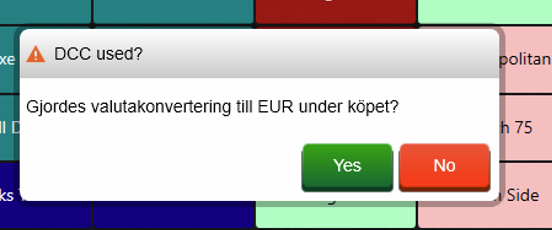
If terminal is in EPAS mode and a card with support for another currency is used for a refund, a dialog box will appear in Domino when the card is swiped/inserted into the terminal.
The waiter needs to answer if currency conversion was made during the original purchase. (i.e. the refund should be done in the card's currency or in SEK):
Functionality overview
| Model | Mode | Send from Domino | Refund SEK | DCC |
Refund DCC |
| C10 | EPAS | X | X | X | X |
| C100 | EPAS | X | X | X | X |
| P@T | X | ||||
| P@T/PayDirect (send from POS to device in P@T mode) | X | X | X | ||
| C150 | EPAS | X | X | X | X |
| P@T | X | ||||
| P@T/PayDirect (send from POS to device in P@T mode) | X | X | X |
Was this article helpful?
That’s Great!
Thank you for your feedback
Sorry! We couldn't be helpful
Thank you for your feedback
Feedback sent
We appreciate your effort and will try to fix the article