Info
KDS is short for "Kitchen Display System", a kitchen ticket display system that substitutes kitchen printers.
Instead of using paper tickets, all kitchen tickets are displayed on a screen, giving the staff a better overview of orders and their status. Since displays are interactive, chefs can change order status by tapping on the touchscreen. Order status change is then reflected on other kitchen displays (if several are used). This greatly improves communication between stations and reduces the chance of misunderstandings and missed orders. It also enables the chefs to plan their work more efficiently.
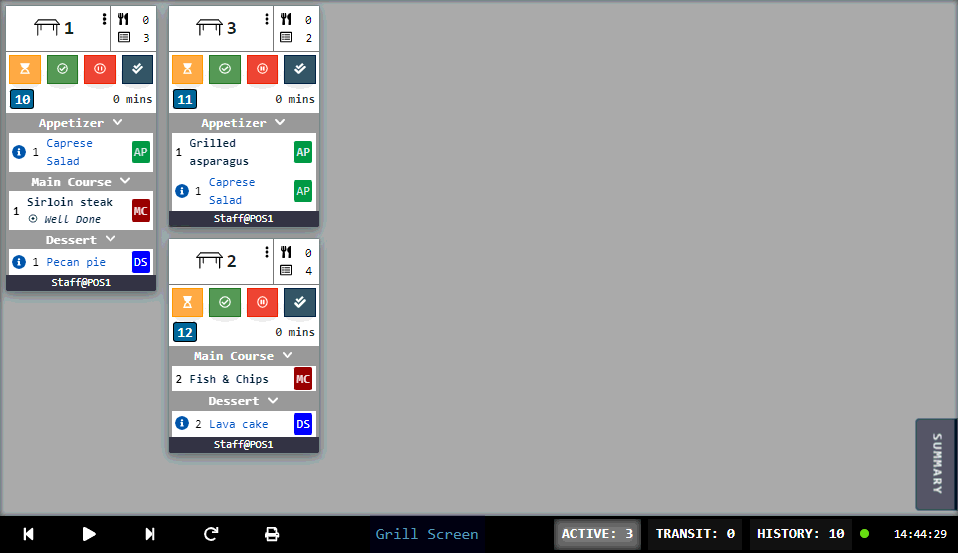
It is possible to configure the KDS system to work with printers so that a paper ticket (with order and table number) is printed when order is complete.
Demo scenarios
Following demo scenarios demonstrate possible use cases of Kitchen Display System (KDS):
Was this article helpful?
That’s Great!
Thank you for your feedback
Sorry! We couldn't be helpful
Thank you for your feedback
Feedback sent
We appreciate your effort and will try to fix the article