This guide explains how to split orders from one table to another.
Splitting the orders on a table
- Add products to table (for info on how to add orders to tables, check out Placing an order).
- Select a table (for info on how to select a table, check out Selecting a table).
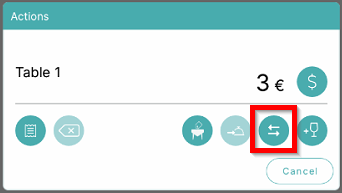
- To split the orders on a table, select the Split symbol:
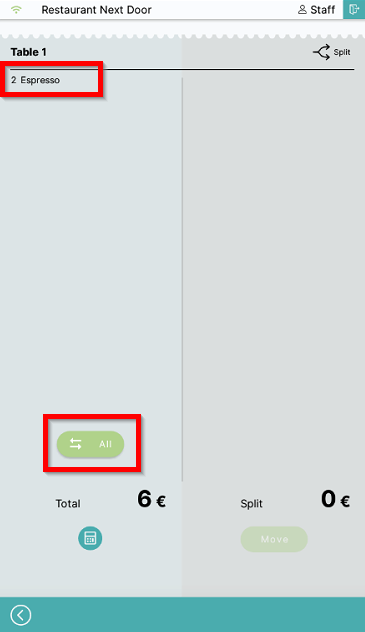
- Select the products in the left column to move them to the Move column (the right one). You can also see the All symbol to move everything:
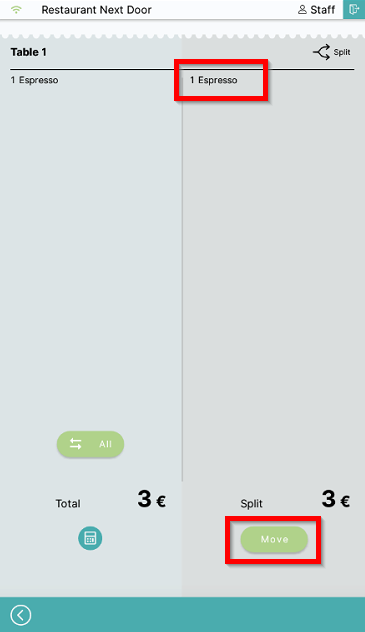
- After products are moved to the Move column, select Move to move them to a different table:
- A table choice menu will display, choose which table you want to move the products to:
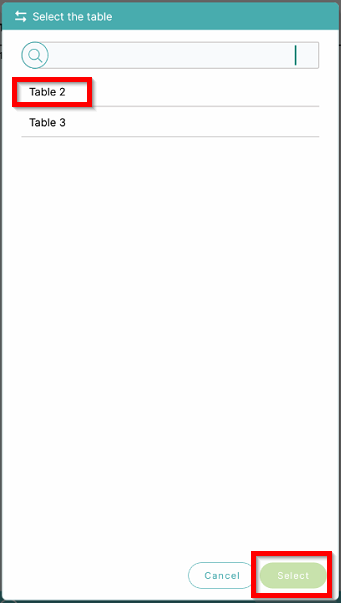
- Products have now been moved to the chosen table.
What's next?
To complete the payment, check out Payment.
Was this article helpful?
That’s Great!
Thank you for your feedback
Sorry! We couldn't be helpful
Thank you for your feedback
Feedback sent
We appreciate your effort and will try to fix the article