This article explains how to use a Glory cashbox with Domino.
For an introduction to Glory cashboxes, check out What Is Glory.
Using the Domino Wallet
Wallet icon

Wallet Buttons

Open Wallet
- When opening the wallet, the current inventory is retrieved and used as the starting cash. You can add extra money when opening the wallet. Tap OK afterwards to open the wallet. The added money will be registered as "Cash in”.
- You need to open the wallet to be able to work with the till. Before the first order can be placed, the Wallet must be opened.
Close Wallet
- When closing the wallet, excess bills and coins in the stackers are collected in the storage cassette (safe). These amounts can be configured, so you will generally start with the same amount each day, the rest of the cash will be deposited into the safe (provided the configured amount is present in the bill and coin stackers). The wallet MUST be closed manually after work is done.
Automatically Open Wallet
- If the “Automatically open wallet” option is active, the wallet will automatically open on first order with the amount present in the cashbox. If automatic opening is not active, the wallet must be opened manually before any orders can be placed.
Cash In
- When a cash-in operation is started, the cashbox will begin accepting and counting money. Tap OK on the wallet input screen to complete the cash-in operation.
Cash Out
- Simply select the coins and bills you want to withdraw from the cashbox and tap OK to start the transaction. If you have selected bills to cash out, you must remove them from the cashbox before you can proceed with the till.
Note: A cash-out operation cannot be cancelled. The device can't be reset until the process is completed.
Verify Inventory
- When CLOSING THE WALLET, a check is added, requiring the “Check Inventory” button.
- Explanation: During the day, it may happen that a particular coin/bill/stacker is not counted correctly.
- For example, if the machine needs to return 5x €1 coins and thinks there are still 5x €1 coins in the stacker, but only 4x €1 coins are present, the €1 coin stacker will be flagged by the Glory cashbox.
- At this point, the cashbox determines it is unsure about the correct number of coins or bills in a specific stacker.
- Once a stacker is flagged, you must perform a “Check Inventory” before closing the wallet!
- When you press the “Check Inventory” button, the Glory will eject all coins from the flagged stacker or drop the bills into the safe.
- The reason is the stacker must be completely emptied and then refilled to accurately count again.
- This requirement is imposed by Glory to avoid errors when the machine is uncertain about the number of coins or bills in the stacker.
- The till notifies you when you need to perform a Check Inventory:

Opening/Closing the Wallet
- We have the possibility to automatically open the wallet at the start of the day (with a fixed starting amount), or you must open it manually with the option to perform a cash in transaction.
- This method can secure the wallet from being accessed by servers.
- If you want to open the wallet manually the waiters will only be restricted from performing Cash in or Cash out operations. These will be reserved for authorized personnel.
- The wallet MUST be manually closed after work in the evening!
Starting amount
It is possible to start each day with the same starting amount. We can configure a maximum per stacker for the number of bills and coins that should remain in the stackers. All excess will be deposited into the safe.
- Example: 10x €50 / 10x €20 / 10x €10, etc.
- This ensures you always start with the same amount unless one of the denominations is insufficient.
- For instance, if 10x €10 is configured, but only 9x €10 bills are present at closing, the starting amount will deviate.
Unlock - Empty Cashbox Safe
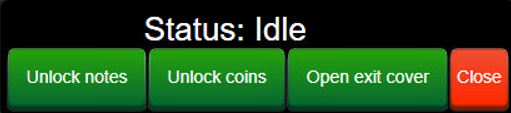
The "UNLOCK" button is only activate starting from Management Profile!
- All bills from €100 and above are automatically deposited into the SAFE when closing the wallet (€100/€200/€500).
- Using the UNLOCK button, you can unlock the safes and choose between the bills or coins safe.
- You must empty the safes using the unlock button!
- For coins, there is a maximum per stacker configured. Any excess above the maximum in the stacker will also be deposited into the safe.
Important
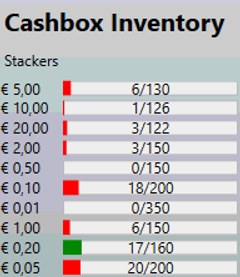
- Ensure there is always sufficient money in the cashbox, otherwise, it may not be able to dispense correct change. This will result in an error or prevent transactions from starting, with a notification displayed on the till.
- Inventory shows in red when there is insufficient money of a particular letter or coin.
- When emptying the safe, it is CRUCIAL to empty it COMPLETELY.
- The safe has a sensor that monitors its contents. If only a part of the money is removed, the sensor may not register it.
- Therefore, when emptying the safes, ensure they are entirely emptied!
- In the OLAP reporting system, a new “Glory” report is available. This shows all deposits into the safe.
- Combined with the Web - inventory button on the till, you can thoroughly verify everything.
- The Glory is not a safe! It must be emptied regularly. Please avoid leaving large amounts of money in the “safe.” We recommend emptying the Glory regularly.
Safe Inventory
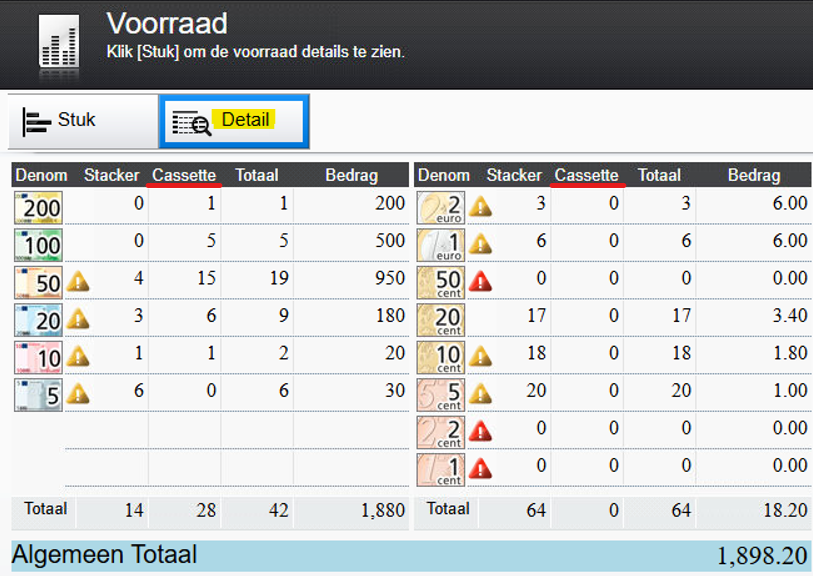
- On the till, you can access the Glory tab via the WEB button, which is only accessible to Management.
- This provides access to the Glory’s inventory, including the safe, via a webpage.
- By pressing the DETAIL button, you can see exactly what is present in the safe/cassettes.
Was this article helpful?
That’s Great!
Thank you for your feedback
Sorry! We couldn't be helpful
Thank you for your feedback
Feedback sent
We appreciate your effort and will try to fix the article