About
As of 01/01/2026, electronic invoicing via Peppol becomes mandatory in Belgium for B2B invoices (between VAT-liable companies).
Invoices sent to private individuals (B2C), such as a caterer issuing an invoice for a private event, are not subject to this obligation and may (for now) still be sent via PDF/email or paper invoice.
In short:
✔️ Mandatory via Peppol: invoices between Belgian VAT-liable companies (B2B) as from 01/01/2026
❌ Not mandatory via Peppol: invoices to private individuals (B2C)
Conditions for automatic Peppol processing
You are actively using the Invoice module on MyTrivec.
For an invoice to be automatically sent via Peppol, all of the following conditions must be met:
The invoice is B2B (VAT-liable company to VAT-liable company)
A valid VAT number is added to the customer in Domino
An email address is added to the customer in Domino
The organisation the invoice is addressed to is registered on Peppol
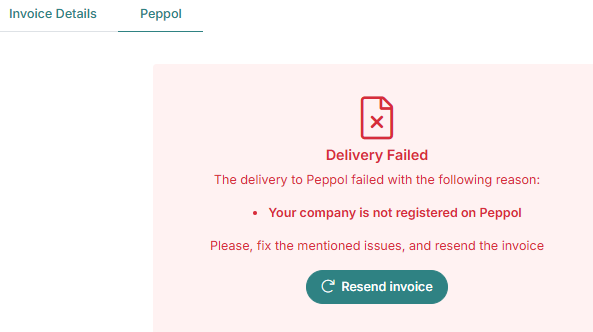
If one of these conditions is not met, the invoice will not correctly be processed via Peppol. You will see an error message from Peppol in MyTrivec.
Invoice processing via Peppol
Once a VAT number and email address are added to a B2B customer in Domino, invoices will be automatically sent via MyTrivec and Scrada to Peppol, provided all conditions are met.
Processing by Peppol can take up to 48 hours
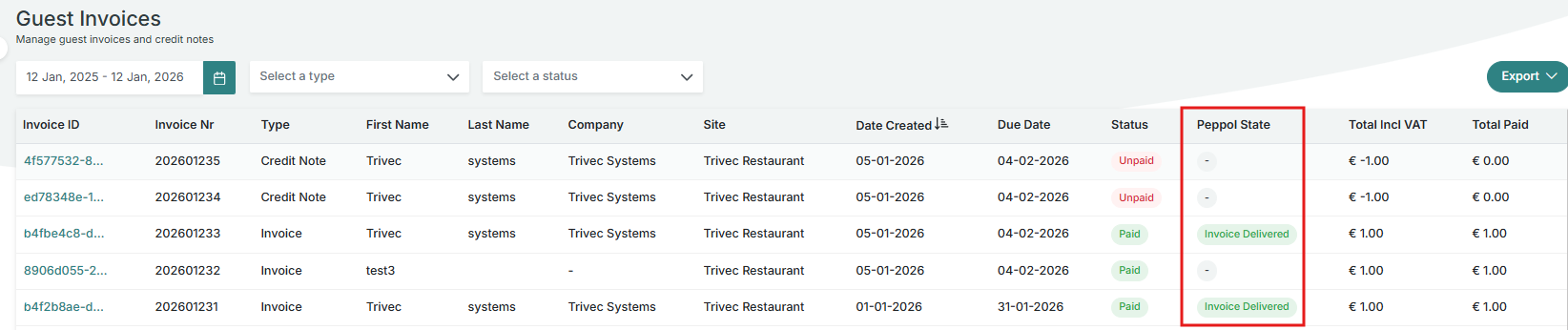
The status can be tracked in MyTrivec via the Peppol State view
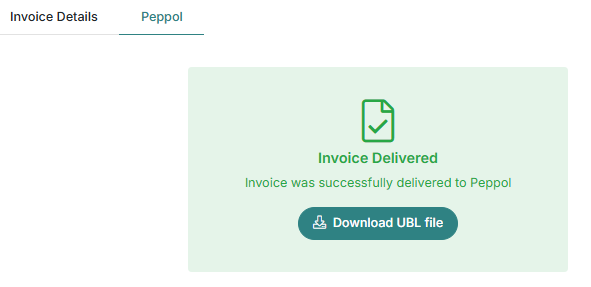
If the invoice is successfully sent, a confirmation will be visible in MyTrivec.
Setting up Domino for Peppol
Editing accounts in the Backoffice
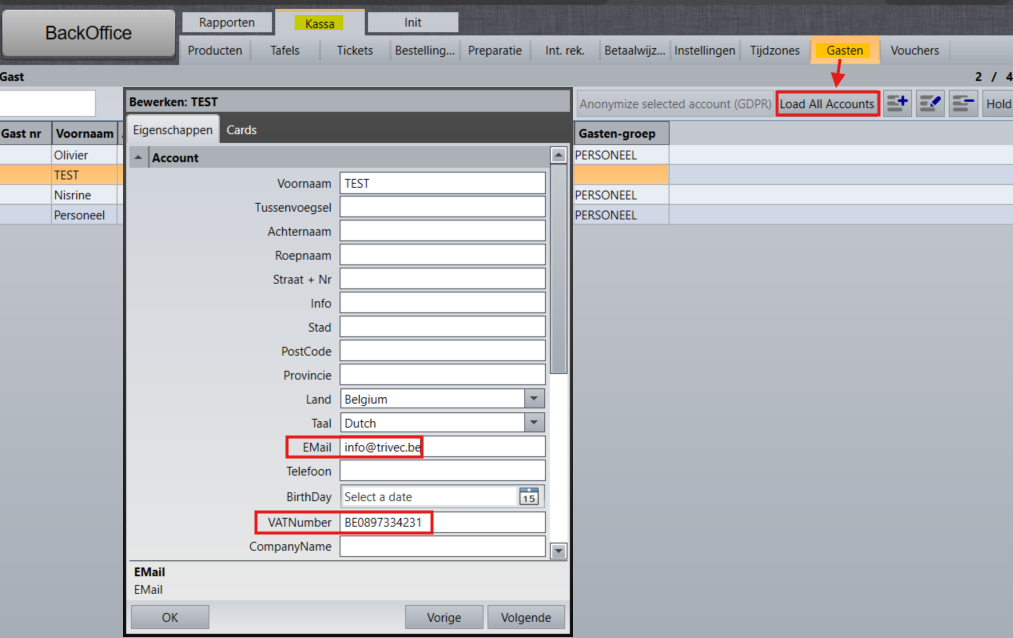
Go to Backoffice → Sales → Accounts.
Click Load All Accounts to retrieve all customers.
Edit a B2B customer by clicking the pencil icon.
-
Add:
The VAT number
The email address
These fields are mandatory for Peppol invoicing.
Editing accounts in the Frontoffice
You can also edit customer accounts via the POS:
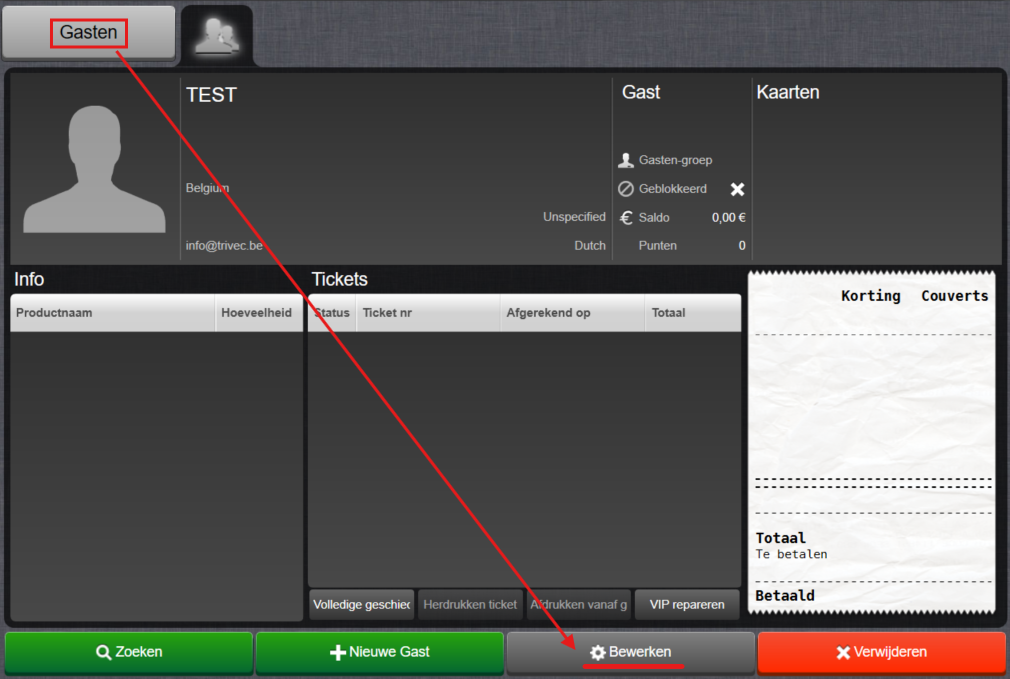
Go to Frontoffice (Cash) → Customer.
Search for the customer.
-
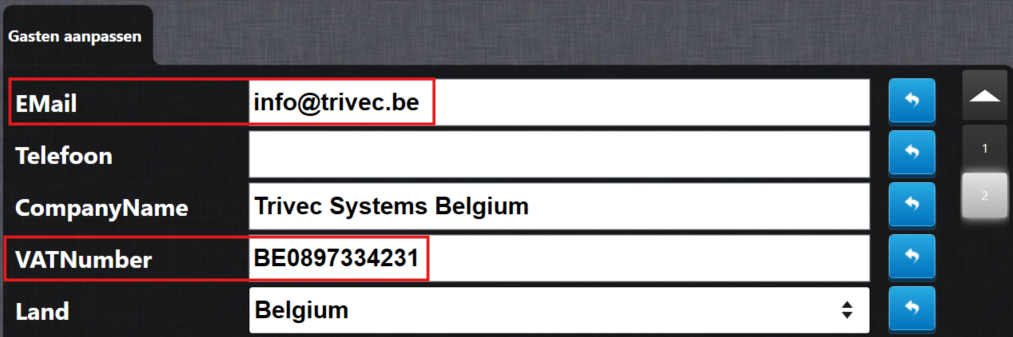
Edit the account and add:
VAT number (correct format)
Email address
VAT number format (important)
The VAT number must be entered in the exact correct format, otherwise the invoice will not be sent to Peppol.
Correct format
BE0897334231
Incorrect formats
BE 0897.334.231
BE0897.334.231
Rules:
No spaces
No dots
Country code + numbers only
Only invoices with a VAT number in this exact format will be sent to Peppol.
If the format is incorrect, an error message will be shown in mytrivec.
If the VAT number was not yet correct on the account in Domino, you still have the opportunity to adjust the recipient's details on the invoice itself on mytrivec. When you open the invoice, you can use the EDIT button to enter the correct VAT number format before manually resending the invoice to Peppol. Via the new Peppol Tab on the invoice. (managing)
Peppol status in MyTrivec
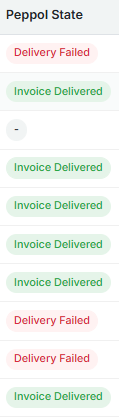
MyTrivec provides a dedicated view that allows you to track the Peppol status of invoices created via the POS.
This view shows whether an invoice:
Has been sent to Peppol
Was successfully delivered
Encountered an error
Managing Peppol
When opening an invoice in MyTrivec, a new “Peppol” tab is available next to Invoice Details.
Via this tab you can:
Verify whether the invoice was successfully sent to Peppol or returns with an error
Download the UBL file for verification
Invoice Delivered
Delivery Failed
Important notes on follow-up
-
The only requirement to send an invoice from MyTrivec to Peppol is:
A valid VAT number
An email address
A Peppol-registered recipient
Further follow-up of B2B Peppol invoices happens in the Peppol portal, not in MyTrivec
B2C invoices should continue to be followed up in MyTrivec as usual
In MyTrivec, you can only verify whether an invoice was successfully sent to Peppol or returns with an error, and resend manually if necessary, after correcting the VAT number format if it was not yet correct in the till
Payment follow-up can still be done manually in MyTrivec if required
Troubleshooting Peppol
This article helps you troubleshoot common issues when sending invoices via Peppol using Domino and MyTrivec. Use this guide if invoices are not sent, remain in a pending state, or show an error.
Invoice is not sent to Peppol at all
Possible causes
The invoice is B2C (private individual)
The customer is missing a VAT number
The VAT number format is incorrect
The customer is missing an email address
The recipient organisation is not registered on Peppol
What to check
Confirm the invoice is B2B.
Open the customer account in Domino.
-
Verify that:
VAT number is filled in
Email address is filled in
Verify that the recipient organisation is registered on Peppol.
Check that invoicing is enabled on the licence.
VAT number error
Symptoms
Error message shown in MyTrivec
Invoice remains in error state
Correct VAT number format
BE0897334231
Common mistakes
Spaces in the VAT number
Dots in the VAT number
Wrong country format
Incorrect examples:
BE 0897.334.231
BE0897.334.231
Solution
Remove all spaces and dots
Use country code + numbers only
Save the customer and resend the invoice if required
Invoice stuck in “Pending” or “Processing” state
Explanation
Peppol processing is not instant.
It can take up to 48 hours before the final status is returned.
What to do
Wait up to 48 hours
Check the Peppol State view in MyTrivec
Do not resend the invoice during processing
Invoice sent but not received by customer
Possible causes
Recipient is not correctly registered on Peppol
Recipient Peppol endpoint is inactive
Recipient system rejected the invoice
What to check
Confirm with the customer that they are Peppol registered
Ask the customer to check their Peppol inbox or ERP system
Verify the Peppol status in MyTrivec
Further investigation must be done via the Peppol portal, not MyTrivec.
Invoice shows “Error” in Peppol State
Common reasons
Invalid VAT number
Missing mandatory fields
Recipient not registered on Peppol
What to do
Open the invoice in MyTrivec.
Go to the Peppol tab.
Review the error message.
Correct the issue in Domino if possible.
Follow up via the Peppol portal if needed.
Can I resend a Peppol invoice?
Important
Once an invoice has been successfully sent to Peppol, it cannot be modified or resent.
Correct approach
Create a credit note
Create a new corrected invoice
This follows Belgian invoicing legislation.
Where should I follow up Peppol invoices?
-
MyTrivec
Verify if the invoice was sent successfully
Download the UBL file
-
Peppol portal
Full invoice lifecycle
Delivery confirmation
Rejections or acceptance by recipient
B2C invoices should continue to be followed up in MyTrivec as usual.
When to contact support
Contact Trivec Support if:
The invoice is not sent despite correct configuration
The Peppol State shows technical errors
The Peppol tab is missing unexpectedly
Provide:
Invoice number
Customer VAT number
Screenshot of Peppol State
Error message (if available)
Was this article helpful?
That’s Great!
Thank you for your feedback
Sorry! We couldn't be helpful
Thank you for your feedback
Feedback sent
We appreciate your effort and will try to fix the article