This article compares the Leat and Domino/Handy functionality and explains how to manage the Leat Loyalty functionality.
Credits
In Leat
Credits are value that Guests collect that are used for activating Rewards.
In Domino/Handy
If Guest account is activated when completing the payment in Domino/Handy, Guest will collect a number of Points equal to the value of bill. For example: 20 € bill will result in 20 Points collected. The Points collected are automatically updated in the Guest account in Leat, where they are called Credits.
Contacts
In Leat
Each Guest has a Contact profile in Leat. Contacts are managed in CRM / Contacts menu:
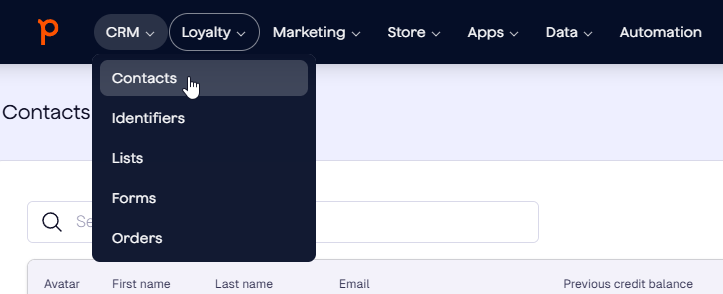
Contacts store basic info about the Guest (Name, Email address, etc), as well as Credits collected on the Credit balance:
In Domino/Handy
Each time User retrieves a Leat Contact via Account/Customer in Domino/Handy, the Contact is synced to Domino, along with the points collected:

Creating and removing Contacts
Contacts are always created and removed in Leat, not in Domino. Once created in Leat, they will be available for Domino/Handy to fetch when searching for Customer/Account. Once removed from Leat, they will no longer be available to be fetched by Domino/Handy.
Contact information is always managed in Leat.
Creating or removing Contacts and managing Contact information in Leat is Customer responsibility.
Identifiers
In Leat
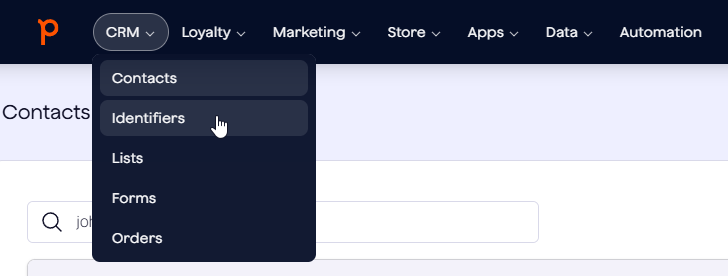
Each Contact in Leat can have an Identifier attached to it, which is a code used with a Bar/QR code or card. Identifiers are managed in CRM / Identifiers menu:
In Domino/Handy
When scanning a Bar-/QR code or a card (Magstripe/RFID/Mifare), Domino/Handy will request Identifiers from Leat. If matching Identifier is found, related Contact will be retrieved as Account/Customer.
Creating and removing Identifiers
Identifiers are always created and removed in Leat, not in Domino. Once created in Leat, they will be available for Domino/Handy to fetch when scanning the Customer/Account bar-/QR code or card. Once removed from Leat, they will no longer be available to be fetched by Domino/Handy.
Creating and removing Identifiers in Leat is Customer responsibility.
Rewards
In Leat
Rewards are benefits that Guest can spend their Credits on. Each Reward has a Name and a certain cost in Credits that will be drawn from the Contact credits up when the Reward is activated:
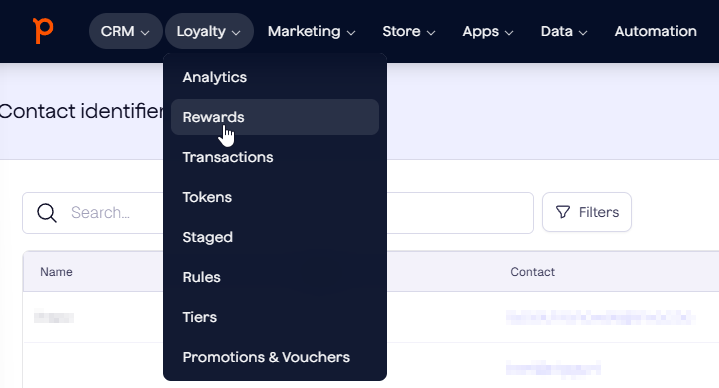
Rewards are managed in Loyalty / Rewards menu:
In Domino
Rewards are Imported as Vouchers in Domino when User selects Import in the Backoffice/Sales/Vouchers: These vouchers are imported unconfigured and their functionality in Domino has to be configured manually using the Domino Voucher functionality (Promo, Discount Product, FreeProduct and Paymode):
 When configured, the voucher settings will persist even if Import is run again. They will only have to be configured again in case they are deleted from Domino.
Creating and removing Rewards
New Rewards are always created and Leat, not in Domino. It is not possible to remove Rewards that have been created. Once created in Leat, they will be available for Domino to fetch when using the Import functionality in Backoffice/Sales/Vouchers. Each time newly created Rewards are imported to Domino, they also have to be configured with expected functionality.
Creating Rewards in Leat is Customer responsibility. Trivec Support is available to assist with configuring the newly imported rewards with Domino functionality.
Renaming Rewards
Rewards must always be renamed in Leat. Renaming them in Domino will cause the Reward to drop its voucher configuration. New Reward name will be updated in Domino/Handy when Import is run.
Types of rewards supported by Domino/Handy
The following types of rewards can be configured for use with Leat:
Reward that applies a promo
For more info on which promo types exist in Domino/Handy, check out Promos.
NOTE: Only one Promo can apply to a product.
Reward that adds a discount product to the bill
NOTE: Discount products are not available in Sweden due to the blackbox regulation.
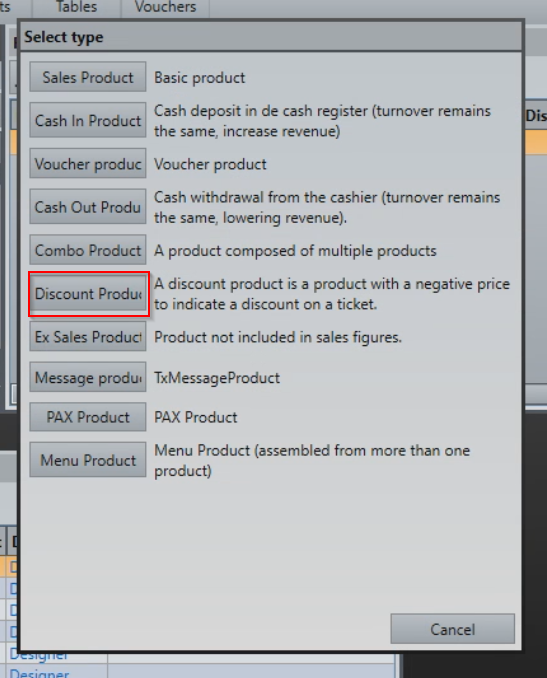
Discount products are products with a negative value that apply a discount to the whole bill. Discount products are a separate product type in Domino:
Reward that adds a free product to the bill
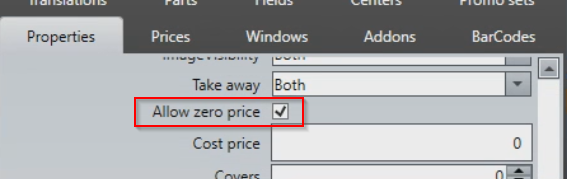
Free products are regular products that when used with a voucher have a cost of 0. Note that the product has to be configured with Allow zero price enabled to work as free product:
NOTE: Free alcoholic products are not allowed in Sweden due to the tax regulation.
Product as a Reward condition
Rewards can be configured so that a certain product needs to exist on the order for the Reward to be applicable.
Was this article helpful?
That’s Great!
Thank you for your feedback
Sorry! We couldn't be helpful
Thank you for your feedback
Feedback sent
We appreciate your effort and will try to fix the article