Sweden has introduced a temporary reduction of the VAT rate on food and takeaway, lowering it from 12% to 6%, starting with April 1st of 2026, valid until December 31, 2027.
This change applies to most food products intended for human consumption and affects Trivec Customers. The policy aims to reduce consumer prices, but it also introduces operational and compliance challenges for businesses.
The temporary rate spans multiple reporting periods, meaning organisations must consistently apply the correct VAT rate across pricing, receipts, invoicing, accounting, and VAT returns.
Equally critical is planning for the end of the temporary VAT cut. When the reduced rate expires, companies must revert to the previous rate immediately. Transitional periods are known to generate errors and may attract additional scrutiny from Swedish tax authorities.
This article outlines which changes are required in our Trivec POS environment to ensure compliance throughout the temporary VAT period.
New product groups and products
The recommended solution for all Trivec Customer that have takeway sales is to configure their products in the following way:
- Create new Takeway 6% products
- Update the sales pages with the newly created Takeaway products.
- (If using an accounting integration) Update the accounting mapping with the new VAT percentage.
Create Takeaway 6% product groups
For an introduction on how product groups are created and managed, check out Product groups.
- Create a product group with the following properties
- Name: TA Food 6%
- (Optional) Data: Accounting number
- (Optional) GroupNr: Accounting number
- VatCode: 6%
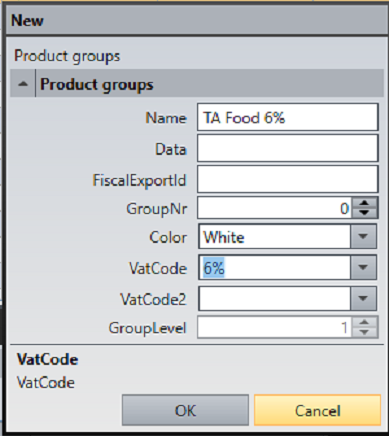
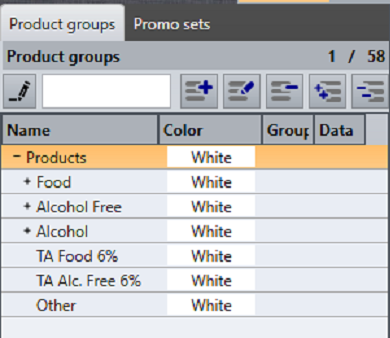
- Repeat the same with Name: TA Alc. Free 6% for alcohol free drinks.
- The results could look like this:
Create new Takeaway products with 6% VAT
For an introduction on how products are created and managed, check out Managing products.
- Inside the newly created product groups, create your takeaway products:
- Name: Takeaway Fish & Chips
- Vat Code 1: Automatically set to 6% (inherited from the product group)
Note: It is required that takeaway products are clearly defined on the receipt as takeaway.
Add products to the sales pages
Drag and drop the newly created products to the product pages. For info on how, check out Managing Product Pages.
Configure Buddy
If using Buddy:
- Request that Trivec Support creates a new center for this purpose.
- Create products in Domino as described above.
- Print new QR codes for these products. For more info on printing Buddy QR codes, check out Managing Buddy QR codes in MyTrivec.
Configuring integrations
- Jamezz, Deliverect & Karma: After Domino has been configured, the new products need to be fetched on the integrator side.
- Omnibost: New VAT percentage has to be mapped and in Omniboost and Customer integration.
- Fortnox (native): New VAT percentage has to be mapped and in Customer Fortnox.
- Piggy: Not affected
Built in TakeAway as an alternative solution
An integrated TakeAway functionality in Domino can also be used for the same purpose and does not require new product groups or products. However, the integrations that you use (accounting integrations, Buddy, Karma, Jamezz, Deliverect etc.) must be correctly configured to accept it.
It is recommended that Customers who have not previously used TakeAway functionality use the New product groups and products solution instead.
Was this article helpful?
That’s Great!
Thank you for your feedback
Sorry! We couldn't be helpful
Thank you for your feedback
Feedback sent
We appreciate your effort and will try to fix the article